If you have been asked how to enable TikTok mass authorisation and had no idea where to start, this post clears it up in five simple steps.
I get this question a lot, usually from creators and affiliates who have been told by a seller to “turn on mass authorisation” with zero explanation of what that means or where the setting even lives.
This is the same simple guide on how to turn on mass authorisation on TikTok that I also send to creators I work with for paid ads.
So let me explain what it is, why it matters for your earnings, and exactly how to switch it on.
What TikTok Mass Authorisation Actually Means
Mass authorisation is a setting that lets sellers use your affiliate videos in their paid Shop Ads.
Here is why that matters to you.
Normally, when you post an affiliate video promoting a product, that video only works for you organically. The seller cannot put ad spend behind it without asking your permission each time.
When you turn on mass authorisation, you give sellers blanket permission to run your affiliate videos as ads for the products featured in them. TikTok’s automated ad system, GMV Max, can then pull your authorised videos in automatically and put real budget behind them.
More budget behind your video means more views, more sales through your affiliate link, and more commission for you. You are letting the seller pay to promote content that earns you money.
That is why sellers keep asking you to switch it on. It helps both of you.
Also Read:
– Meta Andromeda: How To Win Facebook And Instagram Ads In The New AI Era
– 35 Essential Paid Media Tools I Use Regularly As A Digital Marketer
How to Enable TikTok Mass Authorisation on the Mobile App
You need to do this inside the TikTok mobile app. The setting is not in the desktop version, so have your phone ready.
Follow these five steps.
Step 1: Log in to the TikTok mobile app
Open the TikTok app on your phone and log in to the account you use for your affiliate videos, if you are not already logged in.
Make sure it is the correct account. If you post affiliate content from a specific creator account, sign in to that one, not a personal account you never post from.
Step 2: Go to the TikTok Shop Creator Center
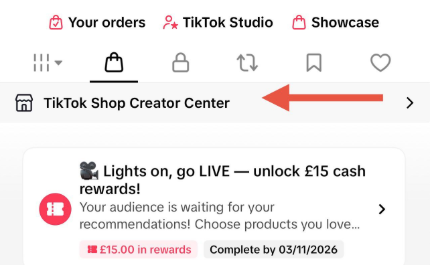
Once you are logged in, head to the TikTok Shop Creator Center inside the app.
This is the hub where you manage everything related to your affiliate activity, your commissions, your product links, and your permissions.
Step 3: Open the menu
https://solamathew.s3.eu-west-1.amazonaws.com/Tap+the+menu+icon+(%E2%98%B0)+in+the+top+right+corner.png
Tap the menu icon, the three lines, in the top right corner of the screen.
This opens your settings and options menu.
Step 4: Tap Privacy Settings
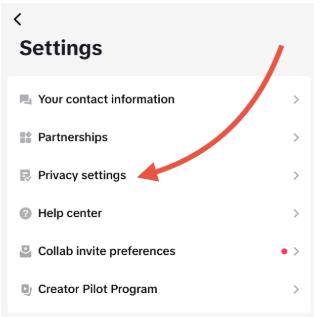
In that menu, find and tap Privacy settings.
This is where your content permissions live, including the one that controls whether sellers can advertise your videos.
Step 5: Turn on Seller Authorisation
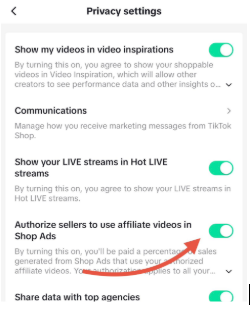
Turn on the setting that says “Authorize sellers to use affiliate videos in Shop Ads.”
That is it. Once this is on, sellers you work with can use your qualifying affiliate videos in their Shop Ads and GMV Max campaigns automatically.
What Happens After You Enable TikTok Mass Authorisation
Once the setting is on, you do not need to do anything else.
Sellers whose products you feature can now include your affiliate videos in their paid campaigns. TikTok’s system can surface your authorised posts as ad creative whenever a seller promotes that product.
You keep earning your normal affiliate commission on every sale that comes through, except now some of those sales are driven by ad budget you did not have to spend.
A few things worth knowing. Authorisation gives the seller permission to advertise your video, but it does not hand over your copyright or let them edit your content freely. You are granting ad-use rights, nothing more. And you can turn the setting back off at any time using the same five steps if you ever change your mind.
If you are a seller reading this rather than a creator, the takeaway is simple. The more of your affiliate creators who enable mass authorisation, the more content your GMV Max campaigns have to work with, and the faster they learn and scale.
Knowing how to enable TikTok mass authorisation takes about thirty seconds once you know where the setting is. Now you do.
Have you turned this on yet, or run into any issues finding the setting? Let me know in the comments.

0 Comments