
As a paid media acquisition specialist, I often get questions from fellow digital marketers about the specific paid media tools I rely on daily. In this post, I’ll share 35 tools I use almost everyday as a paid media acquisition specialist in the United Kingdom.
Although I don't use every tool daily, I rely on all of them regularly. Also, some of these tools overlap. For example, I use Hotjar for a client and use Microsoft clarity for another client, if you get what I mean…
Paid media at scale isn’t about launching more ads, paid media is about building an infrastructure that lets you move faster, see clearer, and make better decisions.
After years of managing 7-figure budgets and generating millions in attributed revenue across Meta, Google, TikTok and email marketing, I’ve refined my stack to tools that actually move the needle.
Here's a quick visual of what a typical paid media tools dashboard might look like in action -- think real-time metrics for ROAS, spend, and impressions across channels.
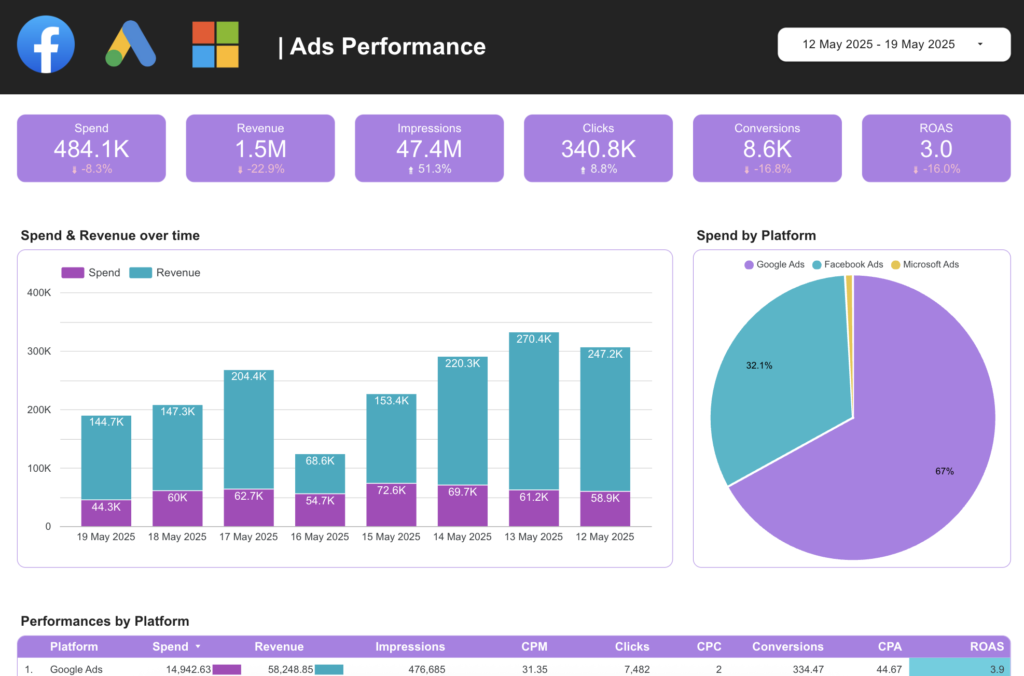
Source: Catchr
Here’s the complete ecosystem I rely on regularly grouped by how I actually use them.
1. Key Paid Media Tools for Campaign Management & Optimisation
This category is where the core of my paid media work happens. These tools allow me to launch, monitor, and refine campaigns at scale, ensuring every pound spent is optimized for maximum return. Without them, I'd be flying blind in a fast-paced environment where algorithms change weekly.
For instance, I start most days diving into performance data to spot underperforming ad sets and scale winners quickly. Tools like these integrate seamlessly, saving hours on manual adjustments.
| Tool | How I Use It |
| Google Ads Manager | My main dashboard for Search, Shopping, PMax & YouTube. I live in search term reports and bid adjustments. |
| Google Ads Editor | Bulk changes at scale… This includes keywords, negatives, ad variations. Saves me hours every week. This is especially great if you’re managing multiple Google ad accounts. |
| Meta Ads Manager | Where I build Facebook and Instagram campaigns and obsess over creative performance. |
| TikTok Ads Manager | High-volume creative testing and top-of-funnel discovery. |
If you're managing similar channels, consider exploring advanced paid media analytics like the ones I discuss further below (se number 3) for even deeper insights.
ALSO READ: Meta Andromeda: How To Win Facebook and Instagram Ads In The New AI Era
2. Essential Paid Media Tools for Competitive Intelligence & Creative Research
Staying ahead in paid media means knowing what your competitors are doing before they do. These tools help me research trends, swipe winning creatives, and adapt strategies on the fly. They're crucial for maintaining a competitive edge in saturated markets like beauty e-commerce and other niches.
I typically spend 30-60 minutes daily here, analysing ad libraries to inspire new tests. This proactive approach has helped boost CTR by up to 45% in past campaigns by borrowing proven hooks and tailoring them to our audience.
| Tool | How I Use It |
| Meta Ads Library | My daily swipe file. I study what’s working for competitors right now. |
| TikTok Ads Library | Trending hooks, formats, and music choices. |
| Google Ads Transparency Library | Spotting who’s spending big on search. |
| Foreplay | My organised creative swipe system. I save and categorise winning ads here. |
| Google Trends | Quick validation of rising search demand before I scale budgets. |
Among the paid media tools for keeping an eye on your competitors, I love Meta Ads Library and TikTok Ads Library most because they give more information than that of Google. This might change tomorrow but these are my preferred at the time of writing this.
3. Paid Media Tools for Analytics, Attribution & Reporting
Accurate data is the lifeblood of paid media success. These tools provide the clarity I need to attribute revenue correctly and report on performance without guesswork. They're especially vital for multi-channel campaigns where native platform data often falls short.
In practice, I use these to cross-verify ad platform metrics against actual business outcomes, spotting discrepancies that could cost thousands. For example, heatmaps from tools like Hotjar have revealed user friction points on landing pages, leading to quick fixes that improved conversion rates by 20-30%.
| Tool | How I Use It |
| Triple Whale | My single source of truth. MER, ROAS, CAC, new customer revenue all in one place. |
| Google Analytics 4 | Deep user journey analysis and cross-channel attribution. |
| Google Tag Manager | Setting up pixels, events, and custom tracking without code. |
| Looker Studio | Beautiful, automated dashboards for the team and leadership. |
| Microsoft Clarity | Heatmaps, session recordings, and rage-click detection to understand where users drop off or get frustrated. |
| Hotjar | Heatmaps, recordings, and on-site feedback polls to improve landing page experience. |
4. Paid Media Tools for Creative & Strategy Tools
Creativity meets strategy in these tools, where I prototype ideas before they hit the ad platforms. They're essential for maintaining a high testing velocity without relying solely on design teams.
I often use Canva for quick iterations on ad visuals, ensuring they align with current trends spotted in research tools. This streamlines the process from concept to launch, reducing time to market for new campaigns.
| Tool | How I Use It |
| Canva | Rapid ad creatives, mockups, and landing page variations. |
| Gamma.app | Turning campaign data into clean presentations in minutes. |
5. Paid Media Tools for E-commerce & Customer Journey
These tools bridge paid media efforts with the actual customer experience, ensuring traffic converts into loyal buyers. They're key for post-click optimization in e-commerce.
Daily, I review Klaviyo flows to see how paid acquisition feeds into retention, adjusting campaigns based on lifetime value metrics.
| Tool | How I Use It |
| Shopify | Revenue validation, AOV tracking, and funnel health checks. |
| Klaviyo | Monitoring how paid traffic feeds into email/SMS revenue. |
6. Productivity & Collaboration Tools Supporting Paid Media Workflows
No paid media campaign runs in isolation. These tools keep teams aligned and workflows efficient.
Slack is my go-to for real-time feedback on creative tests, while Monday.com tracks long-term project timelines.
| Tool | How I Use It |
| Google Workspace | I use this for campaign briefs, performance trackers, and creative folders. |
| Microsoft 365 | Advanced budget forecasting and Excel modelling. Actually, I use this because a client and my current workplace uses it. I think I personally prefer Google Workspace. |
| Slack | Real-time communication with my team and clients. |
| Outlook | Formal client and stakeholder reporting. I receive and send emails here. |
| Google Calendar / Teams | Scheduling and cross-functional meetings. |
| Quick approvals and urgent decisions. | |
| Monday.com | Campaign timelines, testing cycles, and approvals. |
| Notepad | Raw hook ideas and test structures or when I copy text that the format needs clearing. |
7. Browsers & Debugging Tools for Paid Media Troubleshooting
Debugging is non-negotiable in paid media—these ensure tracking is flawless.
I use Meta Pixel Helper daily to verify events before launching new campaigns.
| Tool | How I Use It |
| Chrome | Primary browser for everything + pixel debugging. Except when I’m working with internal teams, that’s when I use the next tool (see below). |
| Microsoft Edge | I use this as a primary browser when working with internal teams in an organisation or business. |
| Meta Pixel Helper (Extension) | Instant Meta pixel status checks and event debugging. |
| TikTok Pixel Helper | TikTok event validation and troubleshooting. |
| Google Tag Assistant | Google’s official tool to verify all tracking tags are firing correctly. |
AI Acceleration Tools Enhancing Paid Media Efficiency
AI supercharges my paid media tools stack, handling repetitive tasks so I can focus on strategy.
Claude excels at brainstorming nuanced ad angles that resonate with audiences.
| Tool | How I Use It |
| ChatGPT | Creative angles, ad copy variations, data interpretation, and report structuring. |
| Google Gemini | Real-time research, campaign brief generation, and competitive synthesis.I find Nano Banana super awesome for image generation and Veo 3 for video generation as well. |
| Claude | Deep strategic thinking, long-form creative briefs, and nuanced campaign planning. |
Why this stack actually works
These aren’t just tools.
They’re a system that lets me test faster, see clearer, and scale with confidence.
The real edge isn’t knowing more tools.
It’s knowing how to connect them so that every dollar spent moves the business forward.
What’s one tool you can’t live without in your paid media workflow?
Please, drop it in the comments section below. I’m always looking to upgrade my stack.
Less I forget, if you need help growing your business through paid media, book a free consultation call with me.

0 Comments